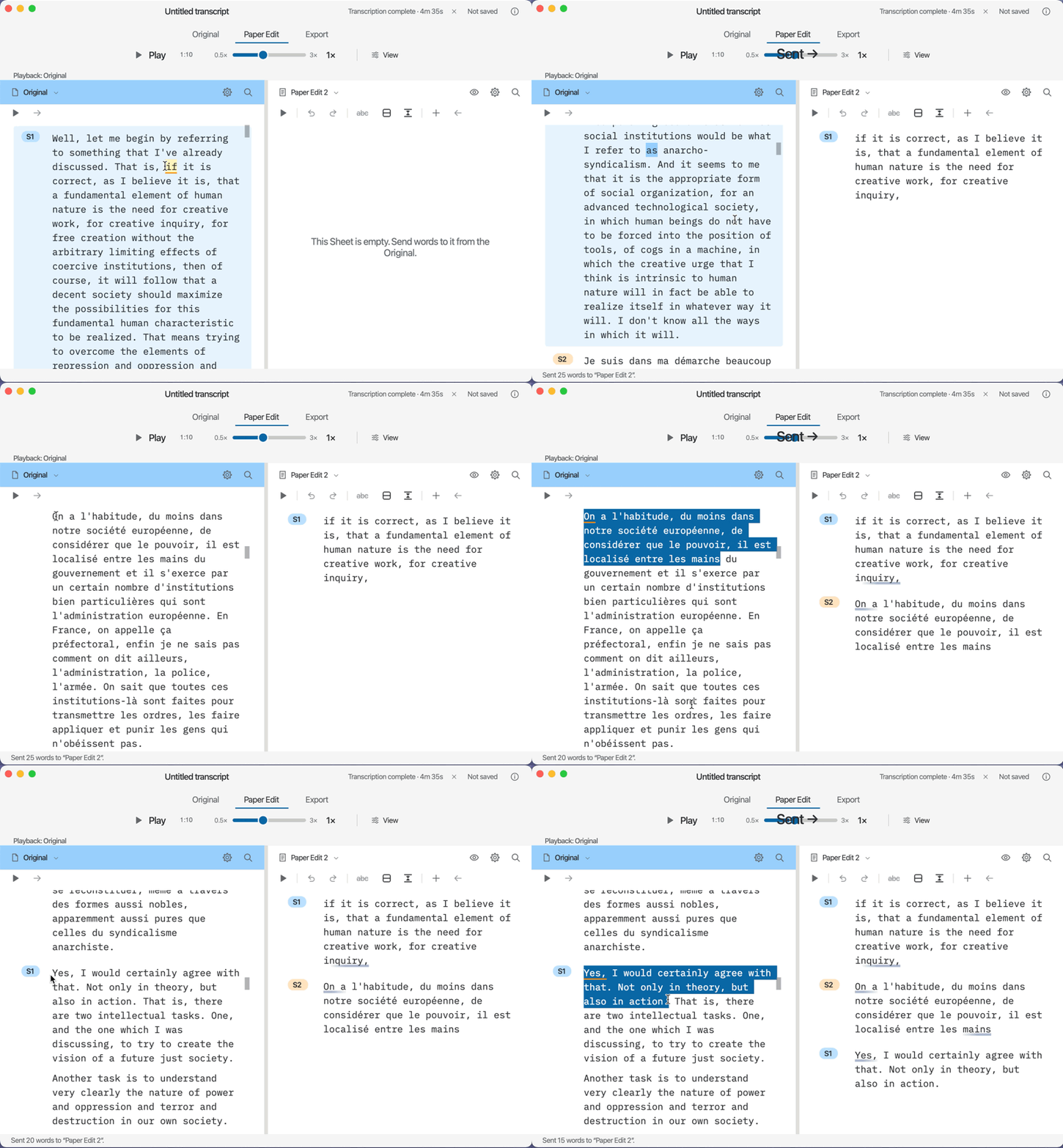
Drop in any video/audio file (or a whole folder), and it transcribes it, in front of your eyes.
It handles 99+ languages, even in the same file. Need a translation? It does that too.
It also auto-detects different speakers for you, and you can fine-tune after it’s done.
Edit.
Now, you can edit your audio or video just like a Word/Google document.
Cut, copy, paste. Take an hour-long interview and chop it down to 5 minutes. Rearrange the order. Take a quote from one video and paste it at the beginning of another. Put an audio clip in the middle.
Whatever you want. It just works.
eXport.
Now that you’ve edited your masterpiece, you have some options:
…direct to video/audio.
You can export to audio file (wav/m4a), or video (mp4). No need to overcomplicate things. Perfect if you need to edit video or audio quickly, and don’t want to learn a complicated program.
…or to your favorite audio/video editor
…but if you want to fine-tune things further, oTREX can export to just about any major audio editor, like Pro Tools, Logic, Reaper, Audition, and more.
For video, you can export to Adobe Premiere, Final Cut Pro, Davinci Resolve, and more.
It’s non-destructive: oTREX re-creates every edit you made, so that when you open your project, everything can be adjusted however you like.
…your plain transcript
You can also just export the transcript, either as plain text, or a color-coded Word/Google Doc.
wait, what’s that first ‘o’ for, then?
‘offline’. This is the most important part.
I’m a journalist, and I often interview people who need to remain anonymous for their own safety.
Uploading an interview to the cloud is convenient, but it’s not safe. It could get leaked. A company could use it to train AI models. Not acceptable for my line of work.
And if all your work is in the cloud, it’s being held hostage. If you’re on a plane, or a coffee shop with bad WiFi, or that weird corner of your apartment with bad Internet reception, you can’t do any editing.
Some of oTREX is philosophical, some is practical. I needed a tool that I can trust. I built it for people like me. Maybe for you, too.
Here are some other features:
collaborate (without a subscription), and more
When you work on an oTREX project, everything is linked: the original video/audio files, and the edits you’ve made. So you can toss it on an external drive, no problem.
But you can also put it in a Google Drive or a Dropbox, or whatever service you like.
You make your edits. Then they make some additional edits. Go back and forth until you’ve both got a final project. No subscription, no extra charge.
Plus more features for pros, like syncing files for podcasts, multi-track recognition for pro cameras with 4+ mic inputs (plus labeling of each speaker), and more.
You can even add multiple files, one after the other, into a project. oTREX takes just about anything you throw at it.
fine-tune the cuts:
Sometimes, editing via the transcript chops off the beginning or end of a word. oTREX lets you smooth out those transitions with a pop-up visualizer to fine-tune where a word begins and ends. Drag the cursor, quick and easy.
Click below to watch a 20-second demo:
It’s great for quickly smoothing out a rough edit, without turning into a full-blown audio editor.
power users’ dream:
Wanna speed through a long interview? Crank it up to 3x speed.
Pulling selects from a long file? Open up two-pane mode, and use the shortcut keys to grab snippets and build an assembly cut.
Need multiple versions of the same project? Duplicate an ‘Edit Sheet’ and have as many versions as you want.
yes, it’s got dark mode. but also, flavors.
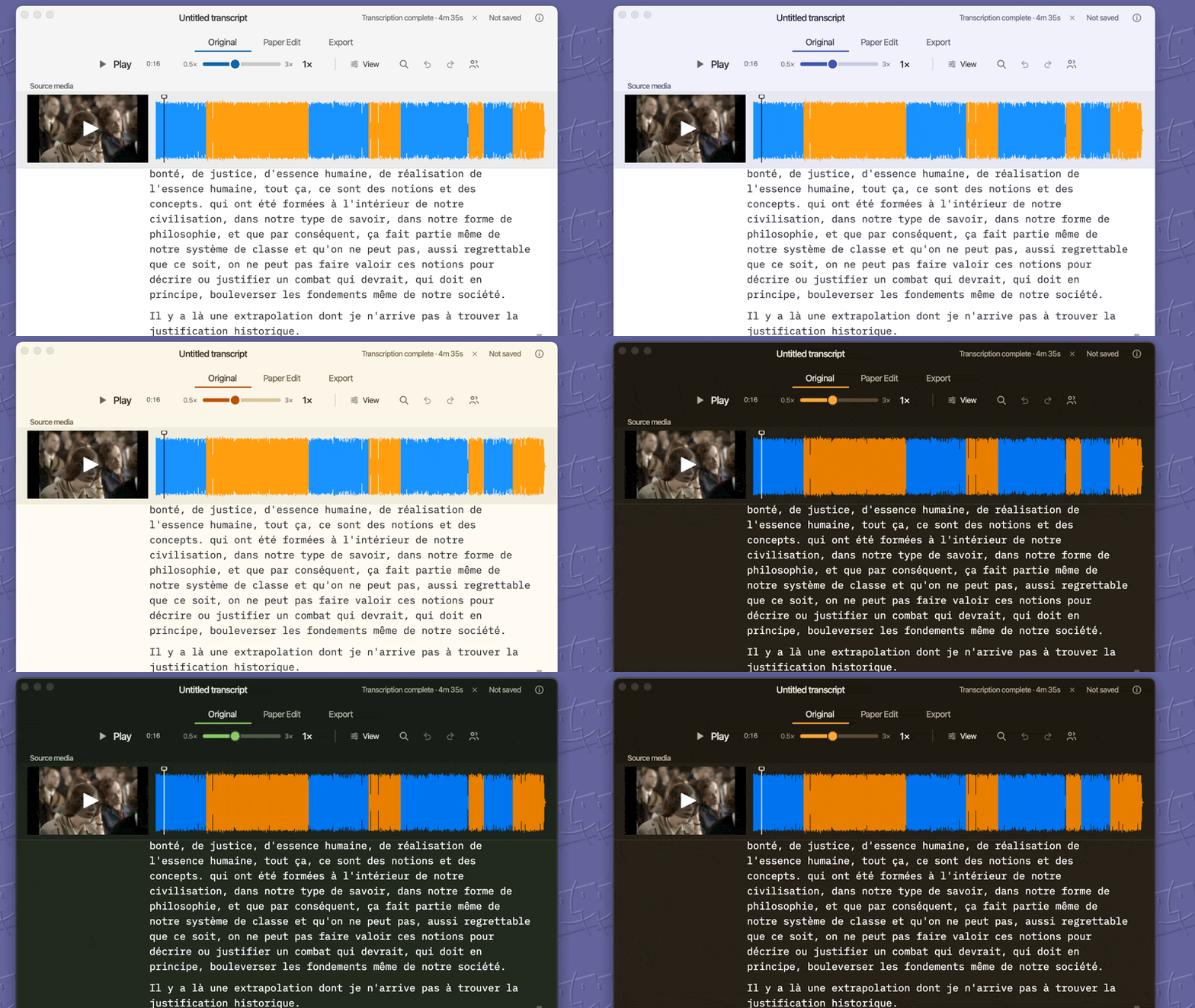
If you’re gonna be staring at a monitor, it might as well look good. You can select Light or Dark mode, and then from there, flavor it with Vanilla, Strawberry, Blueberry, Tangerine, and Matcha Latte themes.
Future pricing TBD: but no matter what: buy once, own forever.
watch a demo
here:
→ private beta. for access: dtdexter[at]proton[dot]me. ←
windows version coming soon.
need help? dtdexter [at] proton.me
‣
privacy+terms of use
last updated: 2026-11-24
PRIVACY
oTREX is made by Generic Youth Media Brand ("we"). This policy explains what information the app and our licensing involve. The short version: your recordings and transcripts stay on your computer, and we don't track you.
What stays on your computer
Your recordings, transcripts, projects and exports. oTREX transcribes on your own computer. It does not upload your audio, video or text to us, or to anyone else.
Your settings and drafts.
We don't collect any of this:
No analytics or usage tracking.
No crash reports sent automatically. (you can optionally send one to me if you find a bug, though!)
No advertising, and no selling or sharing of personal information.
No account is needed to use the app, or to share your work with others.
When oTREX needs to connect to the internet
Checking your license key. When you enter a key, and now and then afterwards, oTREX checks it with our licensing service. That check sends:
the license key
a random ID the app creates for your computer (it isn't your serial number or any hardware ID)
a label such as "oTREX Mac 1A2B3C4D"
The provider records which computers a key is activated on, so the key's computer limit can be enforced. Like any website, these servers can see your IP address when your computer connects.
Downloading speech models. The first time you use certain features, oTREX downloads model files from Hugging Face (huggingface.co). Hugging Face sees the download request like any other download.
Translation (Mac). Translation is done by macOS on your Mac. The first time you use a language pair, macOS may download language files from Apple. Please see Apple’s privacy policy for more on that.
After setup and a successful license check, oTREX works without an internet connection.
Purchases
Purchases (including free beta sign-ups) go through our payment provider. This collects what's needed to process the order, such as your name, email, country and payment details. We receive your order details and license key from the provider so we can support you.
Email
If you email us, we keep your message and email address so we can help you. You will not be added to any advertising or spam lists.
Our website
whatupdex.com is my personal site; no advertising cookies here.
Your choices
You can ask us what information we hold about you (generally your order details and email messages), or ask us to delete it. To do either, see the support email below. Requests about payment records may need to go to the payment provider, which keeps those records.
Changes
If this policy changes, we'll update the date above and post the new version on our website.
TERMS
Price: during the beta phase, it’s free. Each key works on two computers.
System requirements: a Mac with Apple Silicon (M1 or newer), and macOS 14 or later. Windows requirements TBD.
These terms are between you and Generic Youth Media Brand (“we”) and cover your use of oTREX. By installing or using oTREX, you agree to them.
Your license
We give you a personal, non-exclusive, non-transferable license to install and use oTREX on the number of computers your license key allows. You may use it for personal or work projects. You may not sell, rent or redistribute oTREX itself, or share your license key beyond its computer limit.
Beta
During the beta, oTREX is free. Beta software may have bugs, may change, and may stop working when the beta ends or a paid version is released. Keep backups of anything important. We may end the beta, or change what’s free, at any time.
Your content
Your recordings and transcripts belong to you, and oTREX processes them on your own computer. You’re responsible for having the right to record, transcribe and use your recordings. That includes getting any consent the law requires from the people in them.
Transcripts may contain mistakes
Automatic transcription, speaker labels and translations can be wrong. Check anything that matters, such as quotes, legal or medical material, or anything you publish, against the original recording.
Open-source components
oTREX includes open-source software, listed under About → Open source and licenses and in the files that come with the app. Those components are licensed under their own terms, and nothing in these terms limits your rights under those licenses. In particular:
oTREX includes FFmpeg, licensed under the GNU LGPL version 2.1. You may modify, replace and reverse-engineer the FFmpeg part, and its source code is included with the app. FFmpeg is not owned by us.
Payments
Purchases are handled by Polar, our merchant of record. Polar’s terms apply to the payment itself. During the beta nothing is charged. For paid licenses, the refund policy will be posted at whatupdex.com/software/otrex.
No warranty
oTREX is provided “as is” and “as available”, without warranties of any kind, to the extent the law allows.
Limits on liability
To the extent the law allows, we aren’t liable for indirect, incidental or consequential damages, or for lost data, profits or work. Our total liability for any claim is limited to the amount you paid for oTREX in the 12 months before the claim (during the free beta, that’s $0). Some places don’t allow these limits, so they may not all apply to you.
Ending
You can stop using oTREX at any time. We may end your license if you break these terms. Sections 3–5 and 7–10 continue after that.
General
We may update these terms; we’ll post changes at whatupdex.com/software/otrex and update the date above, and continuing to use oTREX means you accept them.